Sunday, February 23, 2014

Flappy Bird Algorithm Part 4 - An Android Game Demo (Floppy Balloon)

With the previous Flappy Bird Game Algorithm, I believe you would be able to come out with something similar.

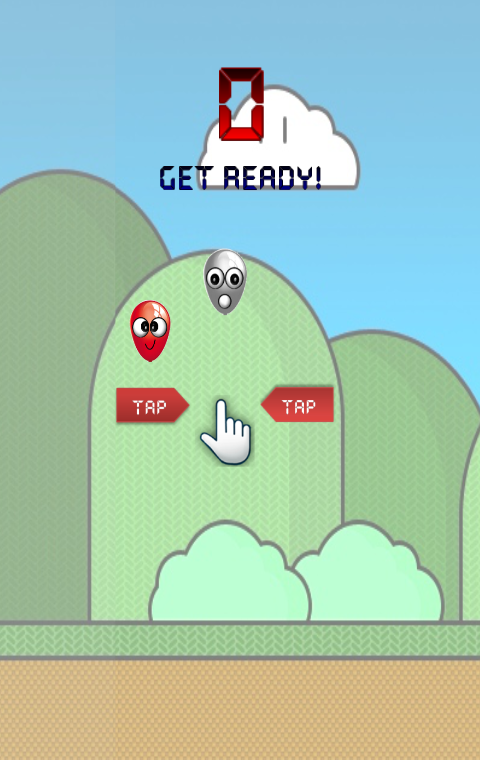
So, here is my published version of the Flappy Bird - Floppy Balloon.

In the Floppy Balloon, i have made the game relatively simpler. And there are 2 modes: Easy and Hard. In the Easy mode, the forward speed of the balloon is slower, and the interval of the obstacles is longer, and you only get 1 score after going through 1 barrier. While in the Hard mode, the pace is increased and you will be rewarded 2 scores for each obstacle that you go through.


Again, to remind that there is a need to perform a 'one-time-only' installation of the latest Adobe AIR app.

Any feedback is welcome~


Thursday, February 20, 2014

Flappy Bird Game Algorithm Part 3 - Collision Detection

So far we managed to make an object flying smoothly with the adjustable gravity and the forward speeds.

Next, it comes the major part of the game: Obstacles generation and Collision Detection

Note that the obstacles (tunnels/pipes) can be generated in the similar ways as the background movement. Now the thing is, how to know if our flying object hits them?

To put it in a better picture, let's have a look at the analogy below:


Here, to investigate whether the object hits both the pipes (upward and downward), it is to check  whether the object is not successfully contained 'inside' the green box region (on the right side).

With this understanding, we only require a few information to complete the task:
a) Coordinates of the flying object + its Width and Height
b) Coordinates of the green box region  + its Width and Height

Luckily, the Width and the Height of the object and the green box are constants. All we need to perform, is a fundamental collision checking, as shown in the function below (Again, it is inside the onEnterFrame function):

public function collisionDetection(_obj1:FlyingObject, _obj2:GreenBox):Boolean
{
     //*Note that my flying object is pivoted in the center
     //check if it is within the pipes
     if(
_obj1.x + obj1.width/2 >= _obj2.x &&
        _
obj1.x + obj1.width/2 <= _obj2.x + _obj2.width)
     {

         //hit upper pipe
         if( _
obj1.y - _obj1.height/2 <= _obj2.y)   return true;
           
         //hit lower pipe
         if( _y1 + _
obj1.height/2 >= _obj2.y + _obj2.height) return true;
     }

}

Straightforward enough. Hopefully with these ideas, you can design and customize the Flappy Bird Game in anyway you want.

Next : Flappy Bird Game Algorithm Part 4 - An Android Game Demo (Floppy Balloon)
Flappy Bird Game Algorithm Part 2 - Background movement

With the ability to make the gravity, now let's enable the background movement.

Just FYI, in the Flappy Bird Game (or any spaceship game), it is the background that moves at the opposite direction which causes the illusion that the main object is flying. It is the typical way of creating such an effect.

Here, i am taking a Super Mario-like background image from here. To make it move smoothly at the back, we need at least 2 background images, which i crop the originals into 2 pieces, as shown below (bg1 and bg2):

Bg1 and Bg2, each pivoted at the top left red point.

At the beginning, the first part of the image (bg1) is shown (filling the device), while the second part (bg2) is placed just after the first image.

Then, with the Event.ENTER_FRAME again, both background images are moved slowly to the left. When the bg1 is completely vanished from the screen, its location (x) is moved to the end of the screen again. The same process is repeated to the image bg2 as well. And the entire process is looping forever.

Not surprisingly, in the onEnterFrame function of the background object, the function is as brief as below:

private function onEnterFrame():void
{
      this.x -= GamePlay.GAME_SPEED;
           
      if(this.x < -
DEVICE_WIDTH)   this.x = DEVICE_WIDTH;
 }

Next: Flappy Bird Game Algorithm Part 3 - Collision Detection

Wednesday, February 19, 2014

Flappy Bird Game Algorithm Part 1 - Gravity and flying


Normally, to create the games involving Physics (eg: gravity), the use of Physics Engine such as Box2D would be a boost for complicated run-time computations. However, in the Flappy Bird game, since the only requirements are to:
  • Make the bird fly upwards while touching
  • Make the bird fall while not flying (with gravity)
the algorithms could be performed easily with few lines of codes without Box2D.

Here, to remind, I am using AS3, Starling Framework and a latest version of Adobe AIR (4.0).

First, I am taking the advantage of Event.ENTER_FRAME to allow the flying object to animate/fly on each frame. In the onEnterFrame function, a gravity is implemented. At the same time, we allow the player to touch any space on the device to activate a 'jump'.

private const UPWARD_SPEED:int = 5;
private const MAX_FLOOR:int = 800; //an indication that it hits the ground
private const GRAVITY:Number = 0.5;
private var objFlying:FlyingObject = new FlyingObject();//and addChild
private var speed:Number = 0; 
private var isJump:Boolean = false;
private function onEnterFrame(e:EnterFrameEvent):void
{
     if(isJump)
     {
         speed = -
UPWARD_SPEED; //negative relative to the normal gravity
         isJump = false; //once a jump is activated, we disable the flag
     }
     speed += (
GRAVITY); //physics ya, the speed is affected by gravity
    
objFlying.y += speed;
           
     if(
objFlying.y > MAX_FLOOR) //if it hits the wall
     {
         speed = 0;
        
objFlying.y = MAX_FLOOR;
     }  

}

private function onTouch(e:TouchEvent):void
{
     ...
     var touch:Touch = e.getTouch(stage);
               
     if(touch.phase == TouchPhase.BEGAN)
     {
          isJump = true; //a touch enables a slight jump
     }   

}

Note that the upward speed, gravity and the floor location are tunable according to your needs. With the Event.ENTER_FRAME, the animation is an easy job.

Next: Flappy Bird Game Algorithm Part 2 - Background Movement

How to create the game like Flappy Bird?


Flappy Bird, another popular game based on the 'simplicity', topped the chart not only in the Apple App Store, but also the Google Play Store before it was removed.

From the perspectives of the game play experience, the Flappy Bird is designed to challenge the consistency of the distance judgement of the players, with very high accuracy. Only 1 Hit Point, one highscore and infinite tries, no Mana Point, no magic, no checkpoint, no multiplayer.

From the views of the game development, the Flappy Bird simply relies on the gravity for the movement, and a simple collision detection while the background is moving at a linear speed.

To be honest, I have no idea why this game becomes so popular, other than the 'simplicity'. And yes, after the tutorial on the Match 3 Game last time, here i would like to create this similar game myself, out of the curiosity. To summarize, i divide the game algorithms into several parts:

a) Flappy Bird Game Algorithm Part 1 - Gravity and flying
  •  Alright, no box2d or other libraries. Only a few lines of codes will do.
b) Flappy Bird Game Algorithm Part 2 - Background movement
  • Is trivial as well. Just need a good image.
c) Flappy Bird Game Algorithm Part 3 - Collision Detection
  • A simple algorithm used to detect the collision of the object with the tunnels/walls.
d) Flappy Bird Game Algorithm Part 4 - An Android Game Demo
  • Apart from the basics, let's demo a self-customized version
Note:
  • I would be using other images to replace the original Flappy Bird.
  • The game requires the Adobe AIR 4.0. You need to upgrade it if prompted.