Thursday, December 12, 2013

How to create the Monopoly Deal Card Game?

Yesterday, I published the Monopoly Deal Mini Minipoly Deal, a lite version of the Monopoly Deal Card Game.


Frankly, i was surprised to find that that isn't an official Monopoly Deal Card Game published in the Google Play Store. Furthermore, the information of the Monopoly Deal's algorithm is very limited from the search engines. A brief search of "How to create the Monopoly Deal Card Game" would return a dismayed result. Hence, curiosity makes me create this similar card game. And only after several weeks of efforts, I came to know the complexity and the challenges behind. To make the explanation clearer, i summarize the difficulties into several points:

a) Too many cards to fit into the screen

Apart from the 4 rule cards, there are a total of 106 cards comprising CASH, PROPERTY, and ACTION. To be more specific, there are around 10 different colors of property cards which may be placed on the table. How to design the graphic user interface (GUI) to accommodate so much spaces for different players? In my Monopoly Deal Mini, i have reduced the card numbers and the card sizes to compromise this issue. But i know it isn't a perfect solution.

b) Too hard to make a great computer Artificial Intelligence (AI)

There are too much variations in the game play. How to tell the computer to decide placing property first before an action, or vice versa? How to know a Sly action first before a Rent action could impact more to the opponents? What kind of payments are the most advantageous to his own? When to become more offensive or defensive? It seriously depends on how much cards on his own hands, tables and those from the opponents' table. Here i have to say my AI is relatively a dumb one... -.-

c) Exception cases are everywhere

There is no general algorithm for this Monopoly Deal Card Game. We have property wild cards that are movable and adjustable at any time. We have Rent actions, Sly Deal, Deal Breaker, Double the Rent, House, Hotel, Pass and Go, Just Say No, and etc which are to be handled differently, and are not categorize-able. Not every property set can own a house or a hotel. How to compute the highest potential Rent? etc etc

In short, only after creating the Monopoly Deal Card Game myself, i realize how complicated this Card Game is. I used to playing this game with lots of fun, but making this to appear as a successful Android game is still to far to achieve....

Minipoly Deal is in the Google Play Store now

Rejoiced! The long awaiting Monopoly Deal Card Game now has a lite version in the Google Play Store - Monopoly Deal Mini Minipoly Deal (Updated app name)


First, I admit i am just a fan of this card game. :)

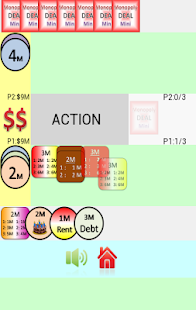
Be honest, this game is created out of curiosity, as i am one of the Monopoly Deal Card Game fans as well. However, compared to the original Card Game, my Minipoly Deal (the mini version of the Monopoly Deal) is relatively having lesser cards. Also, to fit into the mobile devices, i have made the CASH and ACTION cards spherical, while the PROPERTY cards are in squares instead of rectangles.

The game rules are still remained: You will win the game if you collect three or more property sets. During the game play, you can perform actions to steal/request the cash and the properties from your opponent. At the current version, the Minipoly Deal only has a 1 vs 1 mode, which is player versus computer. To have better understanding of how to play the game, kindly go to the Help section.

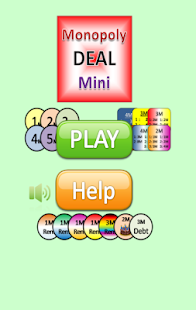
Here's the home page of the game:
Don't you think the top red logo is familiar? There you go, i was trying to imitate the back side of the original Monopoly Deal Card.
So, what are you still waiting? Let's download the game and drop some feedback. Your suggestions will be appreciated :)

Tuesday, December 10, 2013

Brave Heroes - Heroes comparison

Previously, I have posted the Brave Heroes Game Tips with a number of critical information...
But that was for the early stages. After continuing to play the game, I think it is more appropriate to add more points in the game play experience, especially the Heroes comparison.


As you can notice in the picture, i have 2 Melee Heroes reaching the max level of 45: Penguin and the Gloria. And here's a brief comparison


First, please ignore the Enchant, though it may add a little but negligible impact (from my upgrades).


AttributePenguinGloria
Attack930311662
Note: the difference of Attack is around 2400

In short, upgrading the Gloria is more crucial than upgrading the Penguin. Alright, you will say that it is normal to make the subsequently unlocked Heroes stronger. I was thinking the same. And i am quite shocked to see the huge gap between the Heroes, especially the one shown below:

Yes, it is the Ninja Jin VS the Nebiross (Range/Distance Heroes)

AttributeJinNebiross
Attack902827613
Note: the difference of Attack is about 18000!!! (200% - 300% of the Jin)

Here, i would like to mention that, the MAX LEVEL of Nebiross is higher than the Jin, which is 50 instead of 45! (in fact, i believe the Heroes from the second row can reach higher maximum levels)
Furthermore, it is noteworthy to remember that, the Nebiross has two very critical skills.
Skill 1: Shoots an arrow piercing through the enemy, with Attack +200%
Skill 2: Increases the Critical Hit chance by 30%

Basically, if the Nebiross combines both the skills, his attack can reach 27000 x 2.5 x 2, which is more than 100,000 per arrow, and penetrating through ALL the enemies in front! What an awesome combination! It is with this hero that i can survive through Level 40++


And yes, Nebiross is the hero that you can buy with Gold (not diamond) - $500,000, and the Gold can be obtained through the strategies i mentioned before. And of course, i still didn't spend any penny on this game :)

Friday, December 6, 2013

Guess Car Brands - a beginner's Android game

Few months ago, i published a relatively simple Android game - Guess Car Brands.


The objective of creating the game is to learn some basic algorithms, such as how to generate the random alphabetical letters when a random car brand is popped up. At the end of the day, it isn't that complicated. In fact, the approach of creating a unique random numbers has been posted before. As long as the letters are being 'shuffled', it has achieved its original goal.

I admit that this Guess Car Brands is a kind of imitation, of the another game - "Guess Car Brand". Note - my app has an 's' at the end.

It was hoped that in line with the popularity of the game, my game can gain some fame from it. However, it seems that i have been so wrong... oops

Anyway, I just imitate the logo and the game play, but not duplicate the images. Also, i do add more variations into the game play:
a) first mode - choose the country of the cars that you want to guess.
b) second mode - the real car guessing mode. In this mode, there are 25 cars picked from the total, each with 4 scores. At the end, your performance is recorded.

Interestingly, you can use hints when guessing car brands. The hints can be obtained from the practicing in the first mode. However, once you have consumed the hints, the highest score would become only 2.

More and more car brands would be added in the future. Leave a message if you see any room for improvement.

Thursday, December 5, 2013

How to set the frame rate in the Flash Builder Actionscript project?

In some of the games such as Tower Defense or RPG, a consistently high frame rate is necessary to maintain a smooth display of the animations. By default, an Actionscript project in the Flash Builder has a frame rate of 25. This is barely enough for a few movements on the screen. If there are tonnes of bullets or enemy armies bombarding the screen display, the players will experience a horrible game play experience (and most importantly, rate your game badly....)

So, setting the game frame rate is necessary. To do that, you need to include a simple SWF meta tag above your class definition (and AFTER your library import), as stated below:

package
{
    import flash.display.Sprite;
    import flash.display.StageAlign;
    import flash.display.StageScaleMode;
    import flash.geom.Rectangle;
   
    [SWF(frameRate="60", width="640", height="960",backgroundColor="0xffffff")]
    public class YourGame extends Sprite
    {
        public function YourGame()
        {


           ....

In the code, make sure you have your SWF meta tag written just before your Class. Here, a frame rate of 60 is chosen. Apart from the frame rate, you can set other configurations as well, such as width, height, background color, etc.

One thing to note is that, the effect of the frame rate "may not" be reflected if you are in the debugging mode with the Adobe AIR simulator. Therefore, don't be surprised if you still observe some lagging when debugging the game. Everything will be alright when you "Export Release Build".